> ## Documentation Index
> Fetch the complete documentation index at: https://langchain-5e9cc07a-preview-feedba-1762805584-28a22f6.mintlify.site/llms.txt
> Use this file to discover all available pages before exploring further.
# Middleware
> Control and customize agent execution at every step
Middleware provides a way to more tightly control what happens inside the agent.
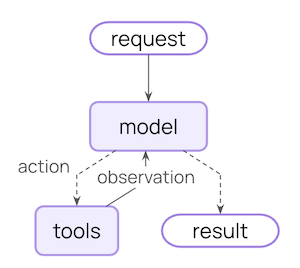
The core agent loop involves calling a model, letting it choose tools to execute, and then finishing when it calls no more tools:
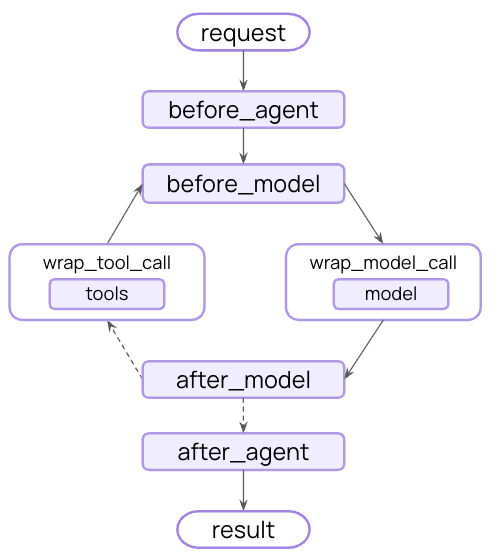
Middleware exposes hooks before and after each of those steps:
## What can middleware do?
Track agent behavior with logging, analytics, and debugging
Transform prompts, tool selection, and output formatting
Add retries, fallbacks, and early termination logic
Apply rate limits, guardrails, and PII detection
Add middleware by passing them to @\[`create_agent`]:
```typescript theme={null}
import {
createAgent,
summarizationMiddleware,
humanInTheLoopMiddleware,
} from "langchain";
const agent = createAgent({
model: "gpt-4o",
tools: [...],
middleware: [summarizationMiddleware, humanInTheLoopMiddleware],
});
```
Refer to the docs below for a list of parameters and configuration details for each type of middleware.
## Built-in middleware
LangChain provides prebuilt middleware for common use cases:
### Summarization
Automatically summarize conversation history when approaching token limits.
**Perfect for:**
* Long-running conversations that exceed context windows
* Multi-turn dialogues with extensive history
* Applications where preserving full conversation context matters
```typescript theme={null}
import { createAgent, summarizationMiddleware } from "langchain";
const agent = createAgent({
model: "gpt-4o",
tools: [weatherTool, calculatorTool],
middleware: [
summarizationMiddleware({
model: "gpt-4o-mini",
maxTokensBeforeSummary: 4000, // Trigger summarization at 4000 tokens
messagesToKeep: 20, // Keep last 20 messages after summary
summaryPrompt: "Custom prompt for summarization...", // Optional
}),
],
});
```
Model for generating summaries. Can be a model identifier string (e.g., `'openai:gpt-4o-mini'`) or a `BaseChatModel` instance.
Token threshold for triggering summarization
Recent messages to preserve
Custom token counting function. Defaults to character-based counting.
Custom prompt template. Uses built-in template if not specified.
Prefix for summary messages
### Human-in-the-loop
Pause agent execution for human approval, editing, or rejection of tool calls before they execute.
**Perfect for:**
* High-stakes operations requiring human approval (database writes, financial transactions)
* Compliance workflows where human oversight is mandatory
* Long running conversations where human feedback is used to guide the agent
```typescript theme={null}
import { createAgent, humanInTheLoopMiddleware } from "langchain";
const agent = createAgent({
model: "gpt-4o",
tools: [readEmailTool, sendEmailTool],
middleware: [
humanInTheLoopMiddleware({
interruptOn: {
// Require approval, editing, or rejection for sending emails
send_email: {
allowAccept: true,
allowEdit: true,
allowRespond: true,
},
// Auto-approve reading emails
read_email: false,
}
})
]
});
```
Mapping of tool names to approval configs
**Tool approval config options:**
Whether approval is allowed
Whether editing is allowed
Whether responding/rejection is allowed
**Important:** Human-in-the-loop middleware requires a [checkpointer](/oss/javascript/langgraph/persistence#checkpoints) to maintain state across interruptions.
See the [human-in-the-loop documentation](/oss/javascript/langchain/human-in-the-loop) for complete examples and integration patterns.
### Anthropic prompt caching
Reduce costs by caching repetitive prompt prefixes with Anthropic models.
**Perfect for:**
* Applications with long, repeated system prompts
* Agents that reuse the same context across invocations
* Reducing API costs for high-volume deployments
Learn more about [Anthropic Prompt Caching](https://docs.claude.com/en/docs/build-with-claude/prompt-caching#cache-limitations) strategies and limitations.
```typescript theme={null}
import { createAgent, HumanMessage, anthropicPromptCachingMiddleware } from "langchain";
const LONG_PROMPT = `
Please be a helpful assistant.
`;
const agent = createAgent({
model: "claude-sonnet-4-5-20250929",
prompt: LONG_PROMPT,
middleware: [anthropicPromptCachingMiddleware({ ttl: "5m" })],
});
// cache store
await agent.invoke({
messages: [new HumanMessage("Hi, my name is Bob")]
});
// cache hit, system prompt is cached
const result = await agent.invoke({
messages: [new HumanMessage("What's my name?")]
});
```
Time to live for cached content. Valid values: `'5m'` or `'1h'`
### Model call limit
Limit the number of model calls to prevent infinite loops or excessive costs.
**Perfect for:**
* Preventing runaway agents from making too many API calls
* Enforcing cost controls on production deployments
* Testing agent behavior within specific call budgets
```typescript theme={null}
import { createAgent, modelCallLimitMiddleware } from "langchain";
const agent = createAgent({
model: "gpt-4o",
tools: [...],
middleware: [
modelCallLimitMiddleware({
threadLimit: 10, // Max 10 calls per thread (across runs)
runLimit: 5, // Max 5 calls per run (single invocation)
exitBehavior: "end", // Or "error" to throw exception
}),
],
});
```
Maximum model calls across all runs in a thread. Defaults to no limit.
Maximum model calls per single invocation. Defaults to no limit.
Behavior when limit is reached. Options: `'end'` (graceful termination) or `'error'` (throw exception)
### Tool call limit
Control agent execution by limiting the number of tool calls, either globally across all tools or for specific tools.
**Perfect for:**
* Preventing excessive calls to expensive external APIs
* Limiting web searches or database queries
* Enforcing rate limits on specific tool usage
* Protecting against runaway agent loops
To limit tool calls globally across all tools or for specific tools, set `toolName`. For each limit, specify one or both of:
* **Thread limit** (`threadLimit`) - Max calls across all runs in a conversation. Persists across invocations. Requires a checkpointer.
* **Run limit** (`runLimit`) - Max calls per single invocation. Resets each turn.
**Exit behaviors:**
| Behavior | Effect | Best For |
| -------------------------- | ---------------------------------------------------------- | ------------------------------------------------------------------- |
| **`'continue'`** (default) | Blocks exceeded calls with error messages, agent continues | Most use cases - agent handles limits gracefully |
| **`'error'`** | Raises exception immediately | Complex workflows where you want to handle the limit error manually |
| **`'end'`** | Stops with ToolMessage + AI message | Single-tool scenarios (errors if other tools pending) |
```typescript theme={null}
import { createAgent, toolCallLimitMiddleware } from "langchain";
// Global limit: max 20 calls per thread, 10 per run
const globalLimiter = toolCallLimitMiddleware({
threadLimit: 20,
runLimit: 10,
});
// Tool-specific limit with default "continue" behavior
const searchLimiter = toolCallLimitMiddleware({
toolName: "search",
threadLimit: 5,
runLimit: 3,
});
// Thread limit only (no per-run limit)
const databaseLimiter = toolCallLimitMiddleware({
toolName: "query_database",
threadLimit: 10,
});
// Strict enforcement with "error" behavior
const webScraperLimiter = toolCallLimitMiddleware({
toolName: "scrape_webpage",
runLimit: 2,
exitBehavior: "error",
});
// Immediate termination with "end" behavior
const criticalToolLimiter = toolCallLimitMiddleware({
toolName: "delete_records",
runLimit: 1,
exitBehavior: "end",
});
// Use multiple limiters together
const agent = createAgent({
model: "gpt-4o",
tools: [searchTool, databaseTool, scraperTool],
middleware: [globalLimiter, searchLimiter, databaseLimiter, webScraperLimiter],
});
```
Name of specific tool to limit. If not provided, limits apply to **all tools globally**.
Maximum tool calls across all runs in a thread (conversation). Persists across multiple invocations with the same thread ID. Requires a checkpointer to maintain state. `undefined` means no thread limit.
Maximum tool calls per single invocation (one user message → response cycle). Resets with each new user message. `undefined` means no run limit.
**Note:** At least one of `threadLimit` or `runLimit` must be specified.
Behavior when limit is reached:
* `'continue'` (default) - Block exceeded tool calls with error messages, let other tools and the model continue. The model decides when to end based on the error messages.
* `'error'` - Throw a `ToolCallLimitExceededError` exception, stopping execution immediately
* `'end'` - Stop execution immediately with a ToolMessage and AI message for the exceeded tool call. Only works when limiting a single tool; throws error if other tools have pending calls.
### Model fallback
Automatically fallback to alternative models when the primary model fails.
**Perfect for:**
* Building resilient agents that handle model outages
* Cost optimization by falling back to cheaper models
* Provider redundancy across OpenAI, Anthropic, etc.
```typescript theme={null}
import { createAgent, modelFallbackMiddleware } from "langchain";
const agent = createAgent({
model: "gpt-4o", // Primary model
tools: [...],
middleware: [
modelFallbackMiddleware(
"gpt-4o-mini", // Try first on error
"claude-3-5-sonnet-20241022" // Then this
),
],
});
```
The middleware accepts a variable number of string arguments representing fallback models in order:
One or more fallback model strings to try in order when the primary model fails
```typescript theme={null}
modelFallbackMiddleware(
"first-fallback-model",
"second-fallback-model",
// ... more models
)
```
### PII detection
Detect and handle Personally Identifiable Information in conversations.
**Perfect for:**
* Healthcare and financial applications with compliance requirements
* Customer service agents that need to sanitize logs
* Any application handling sensitive user data
```typescript theme={null}
import { createAgent, piiRedactionMiddleware } from "langchain";
const agent = createAgent({
model: "gpt-4o",
tools: [...],
middleware: [
// Redact emails in user input
piiRedactionMiddleware({
piiType: "email",
strategy: "redact",
applyToInput: true,
}),
// Mask credit cards (show last 4 digits)
piiRedactionMiddleware({
piiType: "credit_card",
strategy: "mask",
applyToInput: true,
}),
// Custom PII type with regex
piiRedactionMiddleware({
piiType: "api_key",
detector: /sk-[a-zA-Z0-9]{32}/,
strategy: "block", // Throw error if detected
}),
],
});
```
Type of PII to detect. Can be a built-in type (`email`, `credit_card`, `ip`, `mac_address`, `url`) or a custom type name.
How to handle detected PII. Options:
* `'block'` - Throw error when detected
* `'redact'` - Replace with `[REDACTED_TYPE]`
* `'mask'` - Partially mask (e.g., `****-****-****-1234`)
* `'hash'` - Replace with deterministic hash
Custom detector regex pattern. If not provided, uses built-in detector for the PII type.
Check user messages before model call
Check AI messages after model call
Check tool result messages after execution
### To-do list
Equip agents with task planning and tracking capabilities for complex multi-step tasks.
**Perfect for:**
* Complex multi-step tasks requiring coordination across multiple tools
* Long-running operations where progress visibility is important
Just as humans are more effective when they write down and track tasks, agents benefit from structured task management to break down complex problems, adapt plans as new information emerges, and provide transparency into their workflow.
You may have noticed patterns like this in Claude Code, which writes out a to-do list before tackling complex, multi-part tasks.
This middleware automatically provides agents with a `write_todos` tool and system prompts to guide effective task planning.
```typescript theme={null}
import { createAgent, HumanMessage, todoListMiddleware, tool } from "langchain";
import * as z from "zod";
const readFile = tool(
async ({ filePath }) => {
// Read file implementation
return "file contents";
},
{
name: "read_file",
description: "Read contents of a file",
schema: z.object({ filePath: z.string() }),
}
);
const writeFile = tool(
async ({ filePath, content }) => {
// Write file implementation
return `Wrote ${content.length} characters to ${filePath}`;
},
{
name: "write_file",
description: "Write content to a file",
schema: z.object({ filePath: z.string(), content: z.string() }),
}
);
const runTests = tool(
async ({ testPath }) => {
// Run tests implementation
return "All tests passed!";
},
{
name: "run_tests",
description: "Run tests and return results",
schema: z.object({ testPath: z.string() }),
}
);
const agent = createAgent({
model: "gpt-4o",
tools: [readFile, writeFile, runTests],
middleware: [todoListMiddleware()] as const,
});
const result = await agent.invoke({
messages: [
new HumanMessage(
"Refactor the authentication module to use async/await and ensure all tests pass"
),
],
});
// The agent will use write_todos to plan and track:
// 1. Read current authentication module code
// 2. Identify functions that need async conversion
// 3. Refactor functions to async/await
// 4. Update function calls throughout codebase
// 5. Run tests and fix any failures
console.log(result.todos); // Track the agent's progress through each step
```
No configuration options available (uses defaults).
### LLM tool selector
Use an LLM to intelligently select relevant tools before calling the main model.
**Perfect for:**
* Agents with many tools (10+) where most aren't relevant per query
* Reducing token usage by filtering irrelevant tools
* Improving model focus and accuracy
```typescript theme={null}
import { createAgent, llmToolSelectorMiddleware } from "langchain";
const agent = createAgent({
model: "gpt-4o",
tools: [tool1, tool2, tool3, tool4, tool5, ...], // Many tools
middleware: [
llmToolSelectorMiddleware({
model: "gpt-4o-mini", // Use cheaper model for selection
maxTools: 3, // Limit to 3 most relevant tools
alwaysInclude: ["search"], // Always include certain tools
}),
],
});
```
Model for tool selection. Can be a model identifier string (e.g., `'openai:gpt-4o-mini'`) or a `BaseChatModel` instance. Defaults to the agent's main model.
Maximum number of tools to select. Defaults to no limit.
Array of tool names to always include in the selection
### Context editing
Manage conversation context by trimming, summarizing, or clearing tool uses.
**Perfect for:**
* Long conversations that need periodic context cleanup
* Removing failed tool attempts from context
* Custom context management strategies
```typescript theme={null}
import { createAgent, contextEditingMiddleware, ClearToolUsesEdit } from "langchain";
const agent = createAgent({
model: "gpt-4o",
tools: [...],
middleware: [
contextEditingMiddleware({
edits: [
new ClearToolUsesEdit({ maxTokens: 1000 }), // Clear old tool uses
],
}),
],
});
```
Array of `ContextEdit` strategies to apply
**@\[`ClearToolUsesEdit`] options:**
Token count that triggers the edit
## Custom middleware
Build custom middleware by implementing hooks that run at specific points in the agent execution flow.
## Class-based middleware
### Two hook styles
Run sequentially at specific execution points. Use for logging, validation, and state updates.
Intercept execution with full control over handler calls. Use for retries, caching, and transformation.
#### Node-style hooks
Run at specific points in the execution flow:
* `beforeAgent` - Before agent starts (once per invocation)
* `beforeModel` - Before each model call
* `afterModel` - After each model response
* `afterAgent` - After agent completes (up to once per invocation)
**Example: Logging middleware**
```typescript theme={null}
import { createMiddleware } from "langchain";
const loggingMiddleware = createMiddleware({
name: "LoggingMiddleware",
beforeModel: (state) => {
console.log(`About to call model with ${state.messages.length} messages`);
return;
},
afterModel: (state) => {
const lastMessage = state.messages[state.messages.length - 1];
console.log(`Model returned: ${lastMessage.content}`);
return;
},
});
```
**Example: Conversation length limit**
```typescript theme={null}
import { createMiddleware, AIMessage } from "langchain";
const createMessageLimitMiddleware = (maxMessages: number = 50) => {
return createMiddleware({
name: "MessageLimitMiddleware",
beforeModel: (state) => {
if (state.messages.length === maxMessages) {
return {
messages: [new AIMessage("Conversation limit reached.")],
jumpTo: "end",
};
}
return;
},
});
};
```
#### Wrap-style hooks
Intercept execution and control when the handler is called:
* `wrapModelCall` - Around each model call
* `wrapToolCall` - Around each tool call
You decide if the handler is called zero times (short-circuit), once (normal flow), or multiple times (retry logic).
**Example: Model retry middleware**
```typescript theme={null}
import { createMiddleware } from "langchain";
const createRetryMiddleware = (maxRetries: number = 3) => {
return createMiddleware({
name: "RetryMiddleware",
wrapModelCall: (request, handler) => {
for (let attempt = 0; attempt < maxRetries; attempt++) {
try {
return handler(request);
} catch (e) {
if (attempt === maxRetries - 1) {
throw e;
}
console.log(`Retry ${attempt + 1}/${maxRetries} after error: ${e}`);
}
}
throw new Error("Unreachable");
},
});
};
```
**Example: Dynamic model selection**
```typescript theme={null}
import { createMiddleware, initChatModel } from "langchain";
const dynamicModelMiddleware = createMiddleware({
name: "DynamicModelMiddleware",
wrapModelCall: (request, handler) => {
// Use different model based on conversation length
const modifiedRequest = { ...request };
if (request.messages.length > 10) {
modifiedRequest.model = initChatModel("gpt-4o");
} else {
modifiedRequest.model = initChatModel("gpt-4o-mini");
}
return handler(modifiedRequest);
},
});
```
**Example: Tool call monitoring**
```typescript theme={null}
import { createMiddleware } from "langchain";
const toolMonitoringMiddleware = createMiddleware({
name: "ToolMonitoringMiddleware",
wrapToolCall: (request, handler) => {
console.log(`Executing tool: ${request.toolCall.name}`);
console.log(`Arguments: ${JSON.stringify(request.toolCall.args)}`);
try {
const result = handler(request);
console.log("Tool completed successfully");
return result;
} catch (e) {
console.log(`Tool failed: ${e}`);
throw e;
}
},
});
```
### Custom state schema
Middleware can extend the agent's state with custom properties. Define a custom state type and set it as the `state_schema`:
```typescript theme={null}
import { createMiddleware, createAgent, HumanMessage } from "langchain";
import * as z from "zod";
// Middleware with custom state requirements
const callCounterMiddleware = createMiddleware({
name: "CallCounterMiddleware",
stateSchema: z.object({
modelCallCount: z.number().default(0),
userId: z.string().optional(),
}),
beforeModel: (state) => {
// Access custom state properties
if (state.modelCallCount > 10) {
return { jumpTo: "end" };
}
return;
},
afterModel: (state) => {
// Update custom state
return { modelCallCount: state.modelCallCount + 1 };
},
});
```
```typescript theme={null}
const agent = createAgent({
model: "gpt-4o",
tools: [...],
middleware: [callCounterMiddleware] as const,
});
// TypeScript enforces required state properties
const result = await agent.invoke({
messages: [new HumanMessage("Hello")],
modelCallCount: 0, // Optional due to default value
userId: "user-123", // Optional
});
```
### Context extension
Context properties are configuration values passed through the runnable config. Unlike state, context is read-only and typically used for configuration that doesn't change during execution.
Middleware can define context requirements that must be satisfied through the agent's configuration:
```typescript theme={null}
import * as z from "zod";
import { createMiddleware, HumanMessage } from "langchain";
const rateLimitMiddleware = createMiddleware({
name: "RateLimitMiddleware",
contextSchema: z.object({
maxRequestsPerMinute: z.number(),
apiKey: z.string(),
}),
beforeModel: async (state, runtime) => {
// Access context through runtime
const { maxRequestsPerMinute, apiKey } = runtime.context;
// Implement rate limiting logic
const allowed = await checkRateLimit(apiKey, maxRequestsPerMinute);
if (!allowed) {
return { jumpTo: "END" };
}
return state;
},
});
// Context is provided through config
await agent.invoke(
{ messages: [new HumanMessage("Process data")] },
{
context: {
maxRequestsPerMinute: 60,
apiKey: "api-key-123",
},
}
);
```
### Execution order
When using multiple middleware, understanding execution order is important:
```typescript theme={null}
const agent = createAgent({
model: "gpt-4o",
middleware: [middleware1, middleware2, middleware3],
tools: [...],
});
```
**Before hooks run in order:**
1. `middleware1.before_agent()`
2. `middleware2.before_agent()`
3. `middleware3.before_agent()`
**Agent loop starts**
5. `middleware1.before_model()`
6. `middleware2.before_model()`
7. `middleware3.before_model()`
**Wrap hooks nest like function calls:**
8. `middleware1.wrap_model_call()` → `middleware2.wrap_model_call()` → `middleware3.wrap_model_call()` → model
**After hooks run in reverse order:**
9. `middleware3.after_model()`
10. `middleware2.after_model()`
11. `middleware1.after_model()`
**Agent loop ends**
13. `middleware3.after_agent()`
14. `middleware2.after_agent()`
15. `middleware1.after_agent()`
**Key rules:**
* `before_*` hooks: First to last
* `after_*` hooks: Last to first (reverse)
* `wrap_*` hooks: Nested (first middleware wraps all others)
### Agent jumps
To exit early from middleware, return a dictionary with `jump_to`:
```typescript theme={null}
import { createMiddleware, AIMessage } from "langchain";
const earlyExitMiddleware = createMiddleware({
name: "EarlyExitMiddleware",
beforeModel: (state) => {
// Check some condition
if (shouldExit(state)) {
return {
messages: [new AIMessage("Exiting early due to condition.")],
jumpTo: "end",
};
}
return;
},
});
```
Available jump targets:
* `'end'`: Jump to the end of the agent execution
* `'tools'`: Jump to the tools node
* `'model'`: Jump to the model node (or the first `before_model` hook)
**Important:** When jumping from `before_model` or `after_model`, jumping to `'model'` will cause all `before_model` middleware to run again.
To enable jumping, decorate your hook with `@hook_config(can_jump_to=[...])`:
```typescript theme={null}
import { createMiddleware } from "langchain";
const conditionalMiddleware = createMiddleware({
name: "ConditionalMiddleware",
afterModel: (state) => {
if (someCondition(state)) {
return { jumpTo: "end" };
}
return;
},
});
```
### Best practices
1. Keep middleware focused - each should do one thing well
2. Handle errors gracefully - don't let middleware errors crash the agent
3. **Use appropriate hook types**:
* Node-style for sequential logic (logging, validation)
* Wrap-style for control flow (retry, fallback, caching)
4. Clearly document any custom state properties
5. Unit test middleware independently before integrating
6. Consider execution order - place critical middleware first in the list
7. Use built-in middleware when possible, don't reinvent the wheel :)
## Examples
### Dynamically selecting tools
Select relevant tools at runtime to improve performance and accuracy.
**Benefits:**
* **Shorter prompts** - Reduce complexity by exposing only relevant tools
* **Better accuracy** - Models choose correctly from fewer options
* **Permission control** - Dynamically filter tools based on user access
```typescript theme={null}
import { createAgent, createMiddleware } from "langchain";
const toolSelectorMiddleware = createMiddleware({
name: "ToolSelector",
wrapModelCall: (request, handler) => {
// Select a small, relevant subset of tools based on state/context
const relevantTools = selectRelevantTools(request.state, request.runtime);
const modifiedRequest = { ...request, tools: relevantTools };
return handler(modifiedRequest);
},
});
const agent = createAgent({
model: "gpt-4o",
tools: allTools, // All available tools need to be registered upfront
// Middleware can be used to select a smaller subset that's relevant for the given run.
middleware: [toolSelectorMiddleware],
});
```
```typescript theme={null}
import * as z from "zod";
import { createAgent, createMiddleware, tool, HumanMessage } from "langchain";
const githubCreateIssue = tool(
async ({ repo, title }) => ({
url: `https://github.com/${repo}/issues/1`,
title,
}),
{
name: "github_create_issue",
description: "Create an issue in a GitHub repository",
schema: z.object({ repo: z.string(), title: z.string() }),
}
);
const gitlabCreateIssue = tool(
async ({ project, title }) => ({
url: `https://gitlab.com/${project}/-/issues/1`,
title,
}),
{
name: "gitlab_create_issue",
description: "Create an issue in a GitLab project",
schema: z.object({ project: z.string(), title: z.string() }),
}
);
const allTools = [githubCreateIssue, gitlabCreateIssue];
const toolSelector = createMiddleware({
name: "toolSelector",
contextSchema: z.object({ provider: z.enum(["github", "gitlab"]) }),
wrapModelCall: (request, handler) => {
const provider = request.runtime.context.provider;
const toolName = provider === "gitlab" ? "gitlab_create_issue" : "github_create_issue";
const selectedTools = request.tools.filter((t) => t.name === toolName);
const modifiedRequest = { ...request, tools: selectedTools };
return handler(modifiedRequest);
},
});
const agent = createAgent({
model: "gpt-4o",
tools: allTools,
middleware: [toolSelector],
});
// Invoke with GitHub context
await agent.invoke(
{
messages: [
new HumanMessage("Open an issue titled 'Bug: where are the cats' in the repository `its-a-cats-game`"),
],
},
{
context: { provider: "github" },
}
);
```
**Key points:**
* Register all tools upfront
* Middleware selects the relevant subset per request
* Use `contextSchema` for configuration requirements
## Additional resources
* [Middleware API reference](https://reference.langchain.com/python/langchain/middleware/) - Complete guide to custom middleware
* [Human-in-the-loop](/oss/javascript/langchain/human-in-the-loop) - Add human review for sensitive operations
* [Testing agents](/oss/javascript/langchain/test) - Strategies for testing safety mechanisms
***
[Edit the source of this page on GitHub.](https://github.com/langchain-ai/docs/edit/main/src/oss/langchain/middleware.mdx)
[Connect these docs programmatically](/use-these-docs) to Claude, VSCode, and more via MCP for real-time answers.